Rules
Check In
To access the villa, use the 4-DIGIT personal code that was sent to you before your arrival. The code will be valid only for the period of your reservation, from the agreed check-in date and time until the agreed check-out date and time.
Self check in
Gate access:
- Enter your personal code on the numeric keypad located to the left of the entrance gate.
- Once the code is entered correctly, the gate will open automatically and the alarm will be deactivated, allowing you to enter the entire property without problems.
Key collection:
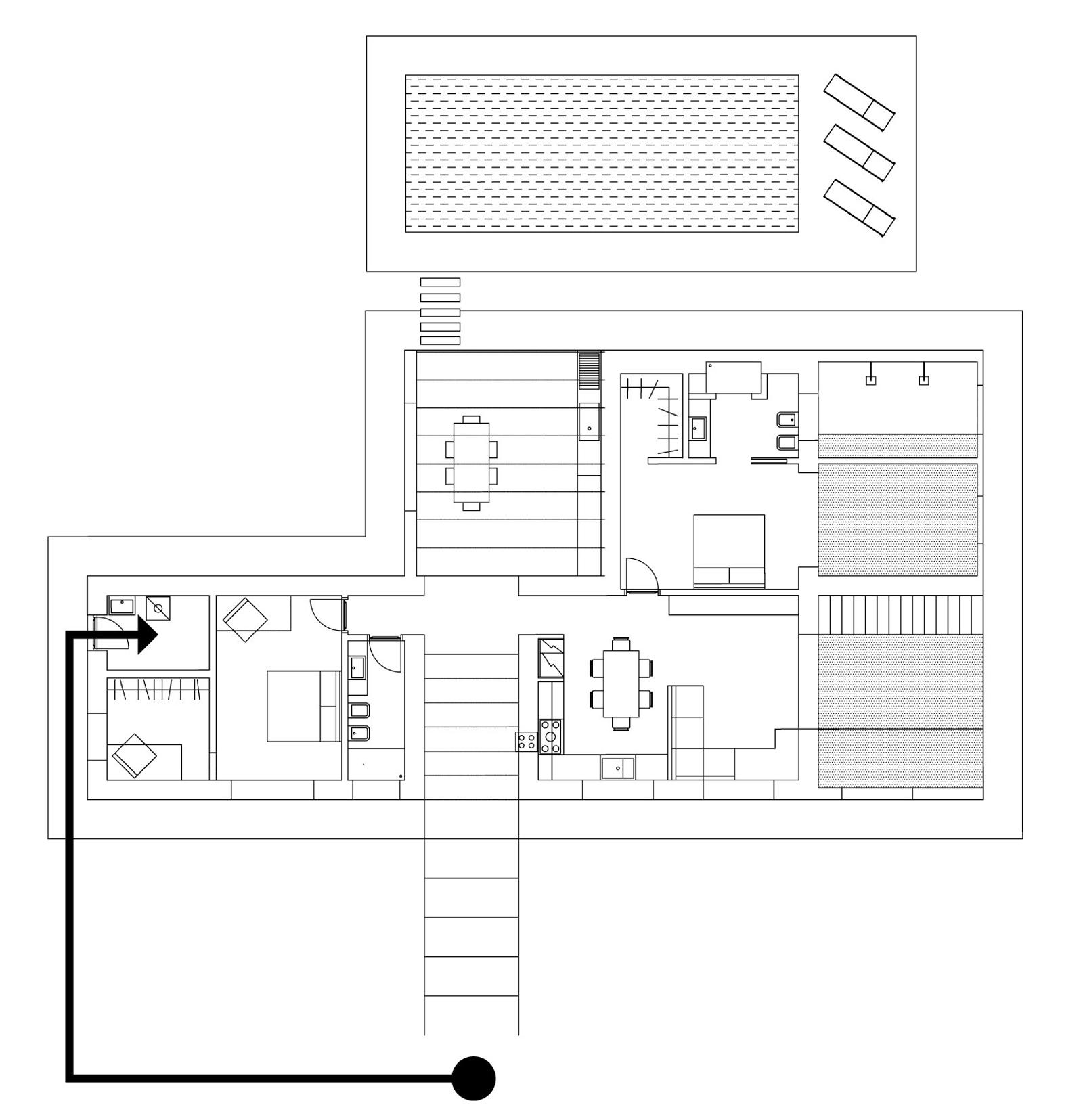
- Locate the technical room on the left side of the house. To reach it, use the stairs leading to the entrance and turn left, following the gravel path that surrounds the house as shown in the attached drawing.
- Enter your personal code on the numeric keypad.
- Once inside, you will find the key set on the left, next to the first aid box.
The key set includes the two keys for the main doors, the gate remote control, and the technical room key (to be used only if your personal code does not work).
Security
Alarm
The villa is equipped with an alarm system fully manageable from the iPad interface and connected to a private security service active 24h.
- It is MANDATORY to activate the TOTAL alarm every time you leave the house, even for short periods, and the NIGHT alarm during the night.
- It is MANDATORY to close all doors and windows every time you leave the villa and during the night.
In case of alarm activation, the system automatically sends a signal to private security: an operator can reach the house within minutes. Communicate the code 2274 to the operator to be recognized.
IMPORTANT: If it is a false alarm or the situation is under control, you can send a WhatsApp message to +39 3668714062 with "FALSE ALARM 2274".
Disclaimer
The Property cannot be held responsible for thefts, losses, subtractions or damage to personal belongings left inside the villa or its appurtenances. Guests remain solely responsible for the custody of their belongings.
Video surveillance
The villa is equipped with 9 external cameras positioned in access and perimeter areas. There are no recordings inside and no audio is recorded. The system is installed exclusively for security purposes (prevention and detection of thefts, damage and intrusions). Images are accessible only by authorized personnel and kept for the strictly necessary time.
Video surveillance clause
By accessing and staying in the villa, the guest acknowledges the presence of the external video surveillance system and accepts its use exclusively for security purposes.
Rules
Check-in/Check-out times
- Check-in: from 2:00 PM to midnight
- Check-out: by 10:00 AM
We ask you to respect these times to allow preparation of the villa for the next guests.
Use and care of the villa
- Smoking: Smoking is strictly forbidden inside the villa.
- Animals: Animals are welcome, but they are not allowed on beds, sofas or other upholstered surfaces. They are also forbidden from doing their business in the immediately external spaces; they can freely use the land delimited by the green net, outside the planted and graveled areas.
- Interiors: The villa is furnished with design objects, quality furnishings and objects of sentimental value. We ask for maximum attention: the property reserves the right to ask the guest for reimbursement of any damage, which the guest tacitly agrees to pay.
- Linen: The spare linen stored in the appropriate compartments is not intended for direct use. If needed, contact the host. Unauthorized use will result in an express laundry service charge (€50–80) at check-out.
- Unregistered guests: Access to the villa is reserved exclusively for guests indicated in the reservation. Any visits or overnight stays by third parties must be authorized by the property. Non-compliance results in immediate reporting and possible termination of stay without refund.
- Pool: Available without time limits. Use it with caution, especially at night and with children or animals. Running on the concrete edges is prohibited.
- Barbecue: Usable for personal use, provided it is positioned away from the facade and plants. After use, clean the grill and dispose of ashes. Never leave it unattended and make sure it is turned off.
- Umbrellas: Must remain closed when not in use, during the night and on windy days.
- Sun loungers: For hygiene reasons, it is mandatory to always use the provided towels.
Safety and prevention
- Drinking water: Tap water is not drinkable. If really necessary, boil it before use in the kitchen. For drinking and preparing beverages, use exclusively bottled water.
- Roof access: Use of the ladder to access the roof is forbidden; access allowed only to authorized personnel.
- Appliances: To avoid voltage drops, avoid using multiple high-consumption appliances simultaneously.
- First aid: Fire extinguisher and first aid kit are available in the technical room.
- Emergency numbers: • 112 General emergencies • 118 Ambulance • 115 Fire department • 113 Police
Environment and cleaning
- Waste separation: Use the bins for plastic, paper, glass and organic following the municipal calendar.
- Waste disposal: Internal bins must be emptied into external bins. It is mandatory to put out bags/bins on scheduled days.
- Penalties: In case of failure to dispose of waste, penalties (€30–50) may be charged at check-out.
Note: The pool maintainer and gardener, by agreement with guests, may perform interventions during the stay.
Liability disclaimer
The property and management company cannot be held responsible for thefts, losses, damage to personal belongings, nor for accidents resulting from non-compliance with rules or improper use of spaces. By entering the villa and beginning the stay, the guest tacitly accepts all the rules and conditions reported.
Wi-Fi and Connection
Network Name: casa a | mare - guests
Password: 2409
*Enter the personal code assigned to you to access the villa; the same code will be valid for all devices you wish to connect.
Assistance: If you experience connection issues, we recommend restarting your device. If problems persist, feel free to contact us via WhatsApp at +39 3386285718 or by email at info@casamare.homes.
Check Out
Before leaving the villa, we invite you to follow these steps:
General check:
- Turn off lights, appliances and air conditioning.
- Close doors and windows.
- Check that you have not forgotten personal items.
- Empty the safe and leave the key inserted.
Key return:
- Make sure you have all the keys received (two for the main doors, the technical room key and the gate remote control).
- Open the gate with the remote control.
- Using code 2409, place the keys in the security box fixed behind the two tuff stones in the parking area.
IMPORTANT: Close the security box only after verifying that you have completed all steps and have already opened the gate with the remote control.
Thank you very much for being our guests. We wish you a safe journey.
Manuals
To ensure you have an enjoyable stay, we have equipped the villa with appliances and smart devices designed to enhance your experience. Below you will find instructions on how to properly use each of them. If you have any doubts, do not hesitate to contact us!
Bluetooth Speaker
Power On: Press the power button on the top of the speaker. The light will start blinking, indicating that the speaker is in pairing mode.
Bluetooth Connection: Activate Bluetooth on your device (smartphone, tablet, etc.). Select the name of the speaker from the list of available devices.
Power Off: Press and hold the power button for 5 seconds.
*You can also move the speaker outdoors by plugging it into the outlet located at the right corner of the patio when exiting the main door. Please take great care not to expose it to harsh weather or direct sunlight.
Electric Kettle
Power On: Fill the kettle with water up to the desired level, without exceeding the maximum line. Plug the kettle into the electrical outlet. Press the switch to turn it on.
Auto Shut-Off: The kettle will automatically turn off once the water has reached boiling point. If you wish to turn it off sooner, do so manually using the switch.
Cleaning: After each use, empty the kettle and dry it.
Projector
Power On: Plug the projector into the power outlet or use the portable battery located in the metal container under the living room shelf, then press the power button.
Device Connection: Use the wireless connection "casa a | mare guest" to view the free channels already configured.
App Connection: To access apps like Netflix, Prime Video, etc., select the app from the main menu and log in using your account details as you would at home.
*Remember to log out of all applications after your stay to prevent other guests from using your accounts.
Image Adjustment: The provided XGIMI projector automatically adjusts focus and image size; if you wish to modify them, use the settings button on the remote.
Power Off: Turn off the projector using the power button and unplug it from the outlet.
*The projector is also portable if connected to the provided portable battery and can be used both inside the villa and outdoors. Please remember to turn it off and store it inside the villa once you have finished using it.
Dishwasher
Loading Dishes: Open the drawer and load the plates, cups, and cutlery, taking care not to block the water jets.
Adding Detergent: Insert the appropriate detergent into the designated compartment.
Program Selection: We recommend selecting the dishwasher's automatic program so that it can optimize the wash according to the loaded dishes.
Start: Press the start button to begin the washing cycle.
Unloading: At the end of the cycle, the dishwasher door will open automatically, allowing you to remove your dishes.
Air Conditioners
Power On via Remote Control: Take the air conditioner's remote and press the power button (usually marked with a power symbol or 'on'). Adjust the desired temperature using the '+' or '-' buttons on the remote. You can select the desired mode (cooling, heating, ventilation) by pressing the mode button.
Power Off: To turn off the air conditioner, press the off button on the remote or on the device's panel.
Induction Cooktop
Power On: Place a compatible pot on the desired cooking zone. Press the induction cooktop's power button.
Power Selection: Use the '+' and '-' buttons or the touch slider to adjust the cooking power.
Function Use: You can activate special functions, such as boost for rapid heating or a timer to set the cooking duration.
Power Off: After use, turn off the induction cooktop by pressing the off button. The surface may remain hot for a few minutes, as indicated by the residual heat light H.
Only use cookware suitable for induction that we have provided. If the pot is not compatible, the cooktop will not activate.
Oven
Power On: Press the power button and select the desired cooking mode (convection, static, grill, etc.).
Temperature Adjustment: Use the buttons or knob to set the appropriate temperature for your preparation.
Timer Use: If the oven is equipped with a timer, set it to program the automatic shut-off.
Lighting Management
Remote Control: You can manage all the villa's lights using the provided iPad or your own devices by following the link provided after your booking. On the main screen, you will see the lights of the different rooms listed. You can turn each light on or off with a simple click.
Brightness Adjustment: Some lights can also have their intensity adjusted (dimmer) by tapping the light icon and sliding to increase or decrease brightness.
On/Off with Traditional Switches: Each room is equipped with traditional switches for controlling the lights.
*If the lights are connected to the smart system, the traditional switch will not disable the control via iPad or other devices, but it will still allow you to manually turn the lights on or off.